|
|
|
|
 Order Demo Order Demo
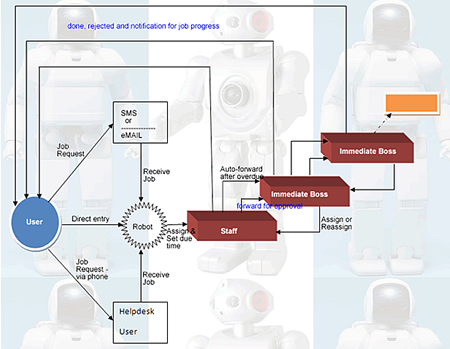
Most of organizations today are facing several problems in their management files and jobs processes. The workflow robot developed to address those problems.
Below are problems commonly faced in management processes:
- Lack of Electronic files (lack electronic record keeping) for day to day organization processes.
- Lack of transparence in DOWN-->TOP and TOP --> DOWN information flow: Difficult to know the status of assignments on progress.
- Long processing time.
- Poor information sharing and Processing queues (sequential processing)
- Difficult to prepare reports.
- Difficult to assess Performance due to Lack of job log book.
- Poor efficiencies.
- Difficult to set priority and enforce deadline: It is very difficult for managers to monitor deadlines and priorities.
- Lack of automatic notifications and reminders: In case staff overloaded is difficult to issue automatic reminders.
- Difficult document referencing.
- Information redundancy: Difficult to renew old issue to present current related issue.
- No Compiled task list.
- No Jobs overload indicator: Employees and managers cannot predict the level of overload to each employee, department and the whole organization.
- Lack of job trailing: No Jobs trail maintained.
- Lack of information backup and poor reliability.
- Poor confidentiality and security: Difficult to enforce confidentiality in some aspect of assignment on progress, also no automated restriction to information access – Restriction only based on human being.
- Lack of integrated technology.
- No guarantee to reach receiver.
- Lack of opportunity for organization process reengineering/change: No proper means of analyzing workflow.
- No jobs and files synchronization.
- Difficult to track files
What Does Workflow Robot Do?
A ‘Workflow Robot’ is a software that helps to administer, coordinate, monitor different jobs and files in the organizational processes.
‘Workflow robot’ used for transparent planning and control of every part of an enterprise - especially where employees work together and share information. Using the ‘Workflow Robot’, paper work will be minimized for administration and the general process time reduced. Also it allows more sophisticated management.
‘Workflow robot’ will allow organization to control the various activities associated with a business process. In addition, also allow a business the opportunity to measure and analyze the execution of the process so that continuous improvements can be made.
Salient Features
The ‘Workflow robot’ offer the following features:
- File manager: Easy to create file, retrieve files, share files and manipulate files while security and confidentiality mantained.
- Web-based Task List user interface: for users to manage their tasks (create, accept, complete, cancel, reassign, forward, etc.)
- Document Management: Document indexed and stored electronically for easy retrieve.
- Forms: Any kind of form can be registered in ‘workflow robot’. (e.g. Leave form, etc.)
- Task Initiation & Control: The business process will be initiated and the appropriate human scheduled and/or engaged to complete each activity as the process progresses.
- Rules based- Decision Making: Rules will be created for each step to determine how workflow-related data is to be processed, routed, tracked, and controlled. As an example, one rule might generate email notifications when a condition has been met. Another rule might implement conditional routing of documents and tasks based on the content of fields. Still another might invoke a particular application to view data.
- Work-lists: These allow each worker to quickly identify their current tasks along with such things as due date, priority, etc. The anticipated workload can be displayed as well. These systems analyze where jobs are in the workflow and how long should take, and then estimate when various tasks will finalized.
- Task Automation: Computerized tasks will be automatically invoked. This will include such things as email notices, etc.
- Event Notification: Staff and/or managers will be notified when workload increases, etc.
- Tracking and Logging of Activities: Information about each step can be logged. This might include such things as start and completion times, person(s) assigned to the task, and key status fields. This information might later be used to analyze the process or to provide evidence that certain tasks were in fact completed.
- Reminders: System will remind about to due jobs and initiator can remind
- Administration and Security: A number of functions will provided to identify the participants and their respective privileges as well as to administer routines associated with any application .
- Excel and Ms-word File Format Support
- Integrated SMS & E-MAIL capability
Additional Benefits
The introduction of workflow management tools should be seen as an opportunity to improve both the underlying business process and the existing organizational structure. Many benefits can be accrued if the workflow management system is implemented as part of a broader business solution.
To minimize processing time
- Will reduce the number of participants in a process
- Will reduce the maximum completion time of each task (automate tasks, notify staff of approaching due dates)
- Will reduce time to transfer work between tasks
- Will reduce maximum queuing time for any one task (prioritize items that have been awaiting action for a long time)
- Will increase the number of tasks running in parallel
Improved efficiency within the business (Deadline can be enforced, makes it easier to track employee performance, Improves Accountability - Monitoring time to execute business functions)
Improved/Increased Access to Information: Workflow management systems will impart corporate knowledge. “Workflow takes the business intelligence that comes from experience and embeds it in business processes”
Improved Security & Reliability: Workflow management “will provides secure storage and access to a consistent set of all of the data related to a service.” Workflow management will unites tasks from many different departments and provides these tasks with organization and integrity. Using mechanisms such as role privileges (determines who can access and/or change information), process control (e.g. a document may need management approval before moving on to the next step) and system back-ups, the data becomes more reliable.
Opportunities for Organizational Change: Workflow Management Systems will help organization and departments achieve the organizational changes necessary to operate effectively in globalization.
Opportunities for Process Change: Since workflow systems force organizations to examine and define their business processes, it is the ideal time to consider business process reengineering. In fact, it is essential that an underlying process be analyzed and improved prior to workflow system implementation in order to avoid further embedding of bad practices.
For more information contact the below address:
TWIGA HOSTING LTD
P.O BOX 38443
PAMBA HOUSE, 2nd FLOOR, ROOM No. 206
DAR ES SALAAM
TANZANIA
TEL: +255 222 136 389
MOB: +255 755 763 951
MAIL: sales@twigaonline.com |
|
|
|
|